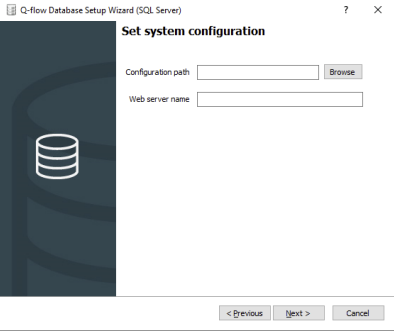
Both system parameters and extended properties are now stored in the database. When upgrading to 4.3, the database installer will ask for the path to the “system.config” file (Configuration path) and the name of the server (Web server name) where the sites are hosted, as shown in the following image:
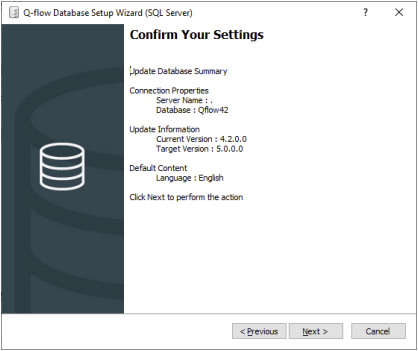
When confirming the installation, the installer will retrieve the various extended properties and system parameters (except MaxDBConnectionRetries and QueryCommandTimeout, which will still be used from the file). They will then be inserted into the database with the corresponding values, and a file named “newSystem.config” will be generated without the information already entered into the database; it is recommended that this file become the new system “system.config”.
In addition, the different sites and services will be added, using the server entered as the Web server name, in the RegisteredService table. If any modification is needed, it must be made from the database. For more information about this table, see the Database Model manual.
To verify that the configuration import was successful, you can do so from SAM Web after its installation. For more information, see the System administration and monitoring manual.
It should be noted that, although the images are from the SQL Server database installer, the behavior for Oracle is analogous.
Enable custom form configuration for the WebForms site
If you want to enable the creation of new WebForms-type custom forms, you need to add a configuration to the “web.config” file of BPM Web:
<addkey="ShowWebFormsProperties"value="true"/>
Otherwise, the WebForms option will not be shown, unless the custom form is already of the WebForms type.
Migration considerations from Q-flow 3.6 or earlier
The change in web site technology causes an incompatibility between the custom forms of the WebForms site and the new MVC Site. Therefore, if you have a process with custom forms, you must migrate them to the new technology to be able to use them in the MVC Site. However, the WebForms site can still be used if necessary. If you have custom forms that only change the appearance of the form, it is recommended to create a View-type MVC form. However, if the form includes C# code, it will be necessary to implement an Area-type MVC form. For more details on how to create custom forms, see the Custom form design manual. It should be noted that the validations specified in the process design tool must be migrated following the new ScriptHost implementation detailed in the manual mentioned above.
The new MVC site uses a tree-like structure for the filters of views, charts, and indicators, while the WebForms site uses only a list. Therefore, the previous filters will be migrated to the MVC site, but if the view, chart, or indicator is edited on this site, the filters will be managed independently on each site.
The technology used to implement dashboards on the WebForms site is incompatible with the new MVC site. Therefore, a one-time migration will be performed at the time of the Q-flow update. Afterwards, dashboards will share their definition (properties and permissions), but not the elements they contain.
The WebForms site is replaced by the new MVC site; therefore, it is no longer required and is no longer part of the default installations. However, since migrating custom forms can be costly, manual installation is allowed by running DesktopFormsSiteSetup.msi, located in the installer folder. This allows WebForms-type custom forms to be accessed from the new MVC site.
If you intend to use WebForms-type custom forms and the virtual directory of the WebForms site is different from CurrentInstallationServer/QFlowWebSite, you must change the webFormsSite attribute in the “Web.config” file of the new MVC site, in the siteConfiguration section, to the path of the WebForms site. In addition, if you intend to use FormsAuthentication, it is recommended to make sure that the protection, name, path, and domain attributes of the authentication section match in the configuration files of both sites, as well as the MachineKey element. This allows both sites to share the authentication cookie and avoids requiring login on the WebForms site when accessing a custom form from the new MVC site.
Below is an example of the elements required in the configuration files:
Since the new MVC site was designed to be usable from different types of devices, the Mobile site is no longer required and is no longer part of the default installations. However, it can be installed manually by running MobileFormsSiteSetup.msi, located in the installer folder.
This site will not receive updates and will become obsolete in future versions.
Migration considerations from qflow 3.5 or earlier
Removal of the Simple MAPI notification sending service. The Simple MAPI notification service is no longer available as part of the product. It is recommended to replace its use with the new Exchange Web Services notification sending service.
The SharePoint web parts have been updated to be distributed as a solution package (wsp). For this reason, the new version of the web parts is only supported on SharePoint 2010 and later versions.
If your organization uses the previous version of the web parts on SharePoint 2003 or 2007, you can continue using them. However, the previous version of the web parts will not be maintained, and future changes to the web services could cause incompatibilities.
Changes to the rich text boxConsistency check for programmatically entered data
As a result of fixing some issues present in the rich text box, the client identifier (id attribute in JavaScript) generated by the control had to be changed. This exclusively affects scripts that use the identifier directly, without affecting scripts that manipulate the control through the GetDataElement or Host.GetData functions provided by Q-flow.
Some fixes were made to the handling of runtime localization, which in some cases was not being handled consistently. The changes are as follows:
In custom code (code steps, events, integrations), the language used to interpret string values is now fixed when assigning values to numeric or date-type data. Until now, the text was being interpreted in the language of the account with which the services were run, but from now on it will be interpreted using invariant culture (English). As an example, consider the following statement:
Host.GetData("número").Value="1.23";
The previous statement had a different behavior on a server in Spanish than on one in English. Note that if numeric-type objects (such as int or decimal) or dates (DateTime) were being used, this change will not affect anything and the code will continue working the same as before. As an example, the following statement does not change its meaning at all:
Host.GetData("número").Value=1.23;
In the custom code API, the Culture property available on User-type objects is removed. This property did not provide useful information, since users in Q-flow do not have a language associated at the system level.
In tag replacement, used for example in the subjects of interactive steps, the language format of the account of the user running the services is now used. This mainly affects how tags corresponding to date-type data and decimal numbers are displayed, since these are the only ones affected by the language. Previously, the Windows installation language was being used, which is harder to change and is usually not what an end user expects.
Web sites and web services now use ASP.NET 4.0 with integrated pipeline. If you use an application pool specific to Q-flow, you must reconfigure it; otherwise, switch to an application pool that meets the requirements mentioned.
Regarding database providers, the version is no longer distinguished, and the only accepted values are now “SQLServer” and “Oracle”. Keep this in mind if reusing the previous “system.config” file.
With the migration to .NET Framework 4.5.1, all custom code and forms now run on the new version. Although unlikely, it is possible that your custom code has some incompatibility with this version. We recommend reviewing the documentation on the changes that could cause problems, at the following link: http://msdn.microsoft.com/en-us/library/ee941656%28VS.100%29.aspx#core.
The behavior of time actions specified in days is changed so that they count the number of working days instead of counting 24 working hours. Keep this in mind if you have time actions of this type.
The GetUsersByExtendedProperties and GetUsersInGroup functions of WebOrganization now return a SimpleUserMessage-type object that contains only the basic properties of the users.
Consistency check for programmatically entered data
Application data type control
This version implements functionalities that require converting application data from its text representation to the native data type. For example, numeric-type application data is stored in the database as a text representation in invariant culture (English), but certain functionalities convert it to the equivalent number.
The compatibility issue lies in the fact that the data could store text that is not convertible to the specified data type. This can only happen through programming, since Q-flow’s form controls do not allow inconsistencies in the data type. As an example, if a custom form programmatically assigned the value “Hello world!” to a numeric-type data item, Q-flow would take that value and store it in the database despite being invalid.
If a case like the one mentioned occurs, the update will almost certainly fail, with a message indicating that the numeric conversion failed. Unfortunately, there is no automatic way to resolve these cases, since modifying the values could result in loss of information. The alternatives are to change the data type to text, which does not impose format restrictions, or to resolve the inconsistencies on a case-by-case basis.
Control of the number of data and role instances
From now on, a check is performed on the number of values provided for data and roles when starting flows or answering tasks. Although Q-flow’s form controls do not allow the number of entered values to be inconsistent with the scope of the data or role, it was possible to achieve inconsistencies if programming was used to load the values, whether using custom forms or web services. The check now performed affects flows where this type of inconsistency occurs. If you receive error messages that a data item or role has too many or too few instances, check whether it is (or is not) multivalued and whether it imposes consistent restrictions on the number of allowed instances.
Migration considerations from qflow 3.3 or earlier
The way client identifiers are generated for multivalued data and roles has been modified. This only affects validations that use identifiers written directly in JavaScript (“hardcoded”); it does not affect validations that use Q-flow API functions.
Numeric text boxes now use the onkeydown attribute. This is something to keep in mind for custom domains that use this attribute, since from now on they will no longer be able to do so successfully. In these cases, it is recommended to dynamically add the handler to the keydown event, which can be done when loading the page using the addEventListener function, for example.
Changes to server-side validations
The form control interface for handling attachments was changed (Qframework.Web.Interaction.Attachments). Although officially the handling of attachments using this control was not supported, it was possible to perform some operations with some effort. Those who used this control to manage attachments must now use the new functions designed for handling attachments from custom forms.
The structure of the files used to locally store unprotected data when designing processes in BPM was changed. While it was always convenient, in this version it is essential to make sure to check in local changes before migrating to the new version; otherwise, local information could be lost.
The algorithm used to draw edges and their labels was changed, so it is possible that process designs do not display exactly the same as in previous versions. Nevertheless, emphasis was placed on maintaining compatibility, so if there are changes, they should be minor.
Major changes were made to the database schema, specifically in tables related to process definitions. If you have reports that access the Q-flow database and in particular obtain data related to process design, it is recommended to review them.
The format of the organizational model export/import file has major changes in this version. Files exported in previous versions cannot be imported in this version.
Migration considerations from qflow 3.2 or earlier
In the MasterPage used in the default forms, the overload of the EnablePrint function was modified; it previously received two arguments and now receives only one. This may cause a compilation error in custom forms that reuse that code. If this is the case, the problem is fixed by modifying the call to EnablePrint in the custom form, passing only the first of the arguments.
Due to changes made to allow customization of lines and multivalued items, the CSS classes used were changed.
In this version, the instanceButton CSS class defined in Styles.css is replaced by the addInstanceButton and removeInstanceButton classes. If your organization uses a custom skin, it is recommended to copy these new classes from one of the default skins (Jade or Sapphire) to your style sheet.
For more information about skins and their customization, refer to the “Customization” section of the Web Site manual.
Migration considerations from qflow 3.1 or earlier
The date control and the item selector were made compatible with mobile devices, and as a result, they no longer open modal dialogs to display their content.
If the calendar page was used, it will no longer be available since it is no longer a standalone page.
If you relied on the blocking effect of a modal dialog before selecting a value, a script might stop working, since modal dialogs are no longer opened and therefore the blocking mentioned no longer exists.
Handling of lines and multivalued items
The handling of lines and multivalued items was refactored to simplify the code and allow setting and retrieving control values through a consistent API.
This change could cause problems in custom forms that accessed the control tree of lines or performed other complex operations. A custom Ajax mechanism was changed to update panels. The structure of the controls generated for lines and multivalued items changed, so if instances of controls within lines or multivalued items were accessed via the child control tree, that code will likely no longer work.
The function to use instead of this mechanism is Interaction.GetDataControl, or directly use the new methods defined in the custom form controls to access their values (recommended option if the data item is identified).
Dynamic control generation
In custom forms where dynamic control generation is alternated through the Interaction.GetGroupPanels method with some fixed controls, there may be problems.
The problem can occur if the GetGroupPanels method is called and, depending on some criteria, for example the grouping text, it is determined whether the group should be added to the page or not. If, in turn, controls are defined through the use of the Data or Line control, this can cause ViewState errors.
If only Data/Line controls are used, or only dynamic generation through GetGroupPanels, there are no problems.
The problem is solved by iterating over the collection of panels through Interaction.GetDataGroups and then calling the Interaction.GetGroupPanel(groupName) function.
The way expressions in the evaluation step are evaluated was fixed, respecting the usual precedence of the NOT, AND, and OR operators.
This does not affect evaluations that used parentheses. It could affect evaluations where operations were performed with different operators without grouping them in parentheses, since previously operator precedence was not applied, but was instead determined by the order in which the operators appeared in the query.
Migration considerations from qflow 3.05 or earlier
Make sure that the message queues created by Q-flow (for news and notifications) are empty. This is especially important if you are migrating to Q-flow 3.1 or later, since message queues are no longer used from that version onward, so any pending message will not be processed by the engines. If the queue is not empty, disable web access to Q-flow and the Web Services, so that no new operations are performed on the system, and wait for the backend to process all pending messages.
The message queues created by Q-flow are located within the private queues in the Windows Services and Applications administration.
Considerations for migrating data in the Personalization Database
Starting with version 3.1, Q-flow includes the ability to store Personalization Database data in the same Q-flow database, so that it is integrated and no external provider is needed. If you are performing an update from version 3.05 or earlier to version 3.1 or later, you have the option of continuing to use the personalization database as you were doing, or of migrating the data and using the new method. It is worth noting that, when using the new model, the connection to the database is made through the Q-flow back-end, which eliminates a direct connection from the front-end to the database.
If you wish to continue using the same personalization database, after installing the Q-flow Web Site you must replace the “Web.Config” file of the web site so that it accesses that personalization database.
If you wish to use the new personalization database, and have data in the previous database that you want to keep, you must migrate that data using the Migration tool, which you can download here (this tool is only available for SQL Server database migration).
To perform the migration, run the tool, enter the server information, database name, and credentials to access the personalization database, and the server information, database, and credentials to access the Q-flow database, and click the “Run Migration” button.
It is important to perform this migration before starting to use the new personalization data storage system, since the migration will overwrite any data stored in the destination database.
Considerations for application data access for the Database update
If you are updating Q-flow from version 3.05 or earlier to 3.1 or later, the mechanism for storing data in the FlowData table has been modified, so if you have reports that directly query that table, or other applications that access that information directly and not through the functions exposed by Q-flow, these will probably stop working correctly and will need to be modified to account for these changes.
In turn, the database update may take a few minutes or even hours depending on the size of the FlowData database, since all of its data is updated. Also keep in mind that during this process the performance of the database engine will be affected, given the intensive use of resources that will take place during this migration.
Feature compatibility with Database Server versions
One of the new features starting with Q-flow version 3.1 is the ability to include multivalued data in searches, so that they are performed on all the values of the data. This feature is only available if your Database server is SQL Server 2008 or later, or Oracle 11 or later.
Migration considerations from Q-flow 3.03 or earlier
Starting with 3.04, a new “master page” resource called CustomFormMaster.master is added to the Q-flow site. This in turn inherits from ContentMaster.master, which already existed previously.
For your custom forms to work correctly, they must use the new master page (CustomFormMaster.master).
If you wish to migrate from 3.03 or earlier and use AJAX controls in your custom forms, you must take this chapter into account.
The compatibility issue arises because the Ajax ScriptManager control was added to ContentMaster.master so that all pages of the Q-flow web site can use it. As a result,
if you have custom forms that define this control, it will be duplicated and will generate a runtime error.
Solution: if you use the ScriptManager or ToolScriptManager control to work with Ajax controls (for example UpdatePanel), simply remove that control from your page. If you also use other Ajax features, such as registering JavaScript files (*.js) or a web service, replace the ScriptManager control with the ScriptManagerProxy control.
Migration considerations from Q-flow 3.01 or earlier
If your processes use custom forms, you must make the following modifications for them to work correctly.
An important change is the refactoring that was performed at the project level. This refactoring allows separating components that were previously exclusive to Q-flow into separate projects that are reused by different applications, such as Q-expeditive. These components now belong to the “Qframework” namespace, which implies some changes in the imports made in custom forms. Some of the detected changes are as follows:
The Qflow.Common.Exceptions namespace changed to Qframework.Common.Exceptions, so if it is included in the code behind, the import statement needs to be changed.
The standard Q-flow controls moved from the Qflow.Web dll (Qflow.Web.Controls namespace) to Qframework.Web (Qframework.Web.Controls namespace), so if these controls were used in the markup, the references need to be changed. An important change is that references in the code behind to the Interaction property must be changed to references to the FlowInteraction property. Where this new property is used, it is necessary to import the Qframework.Web.Interaction namespace.
Messages were moved to the Qframework.BusinessLayer.Messages.Interaction namespace. If these messages are referenced, it is necessary to add the import for that namespace.
The vast majority of enumerations were moved from the Qflow.Common namespace to Qframework.Common, as is the case with ItemScope.
This list of changes is not exhaustive; there may be other namespace changes depending on the classes used in custom forms. If you use a class that is not found within the namespaces suggested here, it is recommended, as a general guideline, to look for a class with the same name in a similar namespace whose name begins with “Qframework”, since that is the most likely place to find it.
Additionally, due to an improvement in the behavior of the Q-flow “Submit” control, some changes arise regarding client-side validations in custom forms. In the previous version, it was possible to add JavaScript validation routines to events such as the form’s “onsubmit” or the Q-flow “Submit” button’s “onclick”, using snippets like the following:
Starting with the new version, these validations, although they will run, will not stop the page postback. However, it is possible with little effort to make these JavaScript-written validations run normally within the page cycle. The key is to use ASP.NET validation controls, specifying that a client-side validation routine will be used. This is done as follows:
A definition like the following is added to the ASP.NET validation control in the page markup:
The JavaScript validation routine is modified to receive the arguments required by the ASP.NET validation framework. In the example we are looking at, the signature would be as follows: function validarForm(source, clientside_arguments)
Within the JavaScript validation routine, the boolean property clientside_arguments.IsValid is used to specify whether the validation was successful or not. If the validation is not successful, the postback is not performed.
You must verify that all the Template elements containing script compile, due to namespace changes and some properties that changed their name. In general, name changes occur in properties ending in “ID” instead of “Id”, for example: “FlowID” is now called “FlowId”. The elements you must check are:
Code steps
Code evaluation steps
Integrations (the operations of each integration, at least the one in production).