v5.6.1
Feature summary
With Qflow 5.6.1, automating and connecting your processes is easier than ever!
The new version includes key improvements focused on the user experience, new integrations with Microsoft, and options that make task execution faster. From more intuitive responses to more secure email sending, we continue to evolve alongside your processes.
Discover the new Qflow!
New features
Email services: more secure and easier to use!
Starting with Qflow 5.6.1, it is possible to connect Qflow directly with email services like Outlook. This update ensures greater security for our users by modernizing notification management.
Enjoy a simpler setup, eliminate the need for manual passwords, and improve the integration with corporate Microsoft accounts.
Respond tasks directly from their email
Now, when a task allows for quick response, the user will receive an email with buttons to respond directly from there. This update optimizes response times, by not requiring the assigned user to enter Qflow Task just to respond.
Leave behind the bottlenecks, ensuring that all users can respond immediately, from any device and place. Fewer steps, less delay!
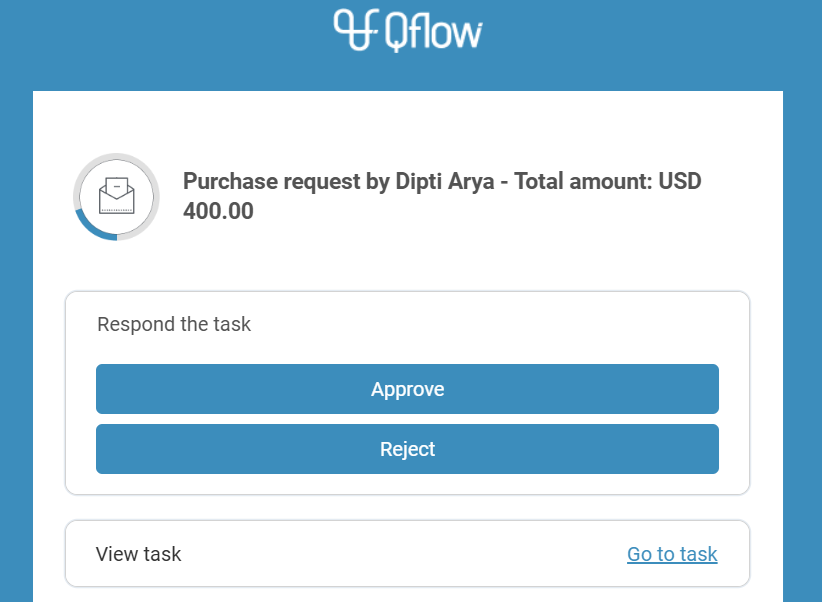
Fig. 17 Email with quick response options
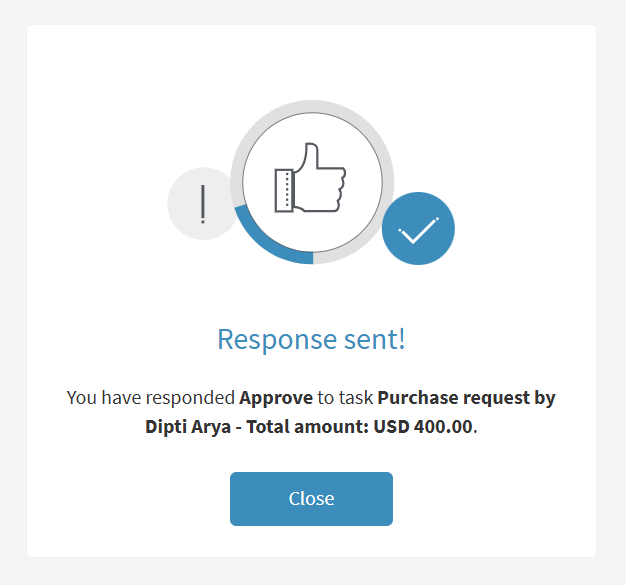
Fig. 18 Response confirmation message
Buttons with task responses
Until now, the possible responses for each task were displayed using dropdown menus. Based on user feedback and aiming to simplify interactions within the tool, responses are now presented by default as buttons.
Bug fixes
Like in every update, we present bug fixes and various improvements to optimize the user experience.